SCH4U - Chemistry 12 (2024-25) - A
SCH4U-25A
1-7C: Finding Information Online - Tips & Strategies
Description
In this activity, you will navigate your way through an interactive presentation as you learn how to effectively find relevant information online.
Page content
Finding Information Online - Tips & Strategies
In this activity you will learn how to effectively find relevant information online. If you have any questions, ask your teacher before completing the research assignment at the end of this lesson.
There are 3 ways of finding information online:
- Search Engines
- Direct Website Search
- Databases
(3 images)
1. Search Engines
- Search engines are the fastest and simplest way of finding information online.
- They provide results based on the individual keywords in your search,r ather than taking the entire sentence altogether.
- This allows them to provide you with thousands of potential websites rather than a handful, or even zero.
- They are useful for finding blogs, news, websites of organizations, facts, and more.
- Stay away from corporate websites that are talking about their business!
Using Search Engines
- Before typing anything into the engine, you need to have an idea of what you are looking for, or what your assignment's topic ic.
- You then need to narrow your research topic. Search engines have so much data that any unrelated words will lead to results that have nothing to do with your topic!
- Organize your idea into a short and simple question, phrase, or statement, and avoid using personal pronouns such as I, We, You
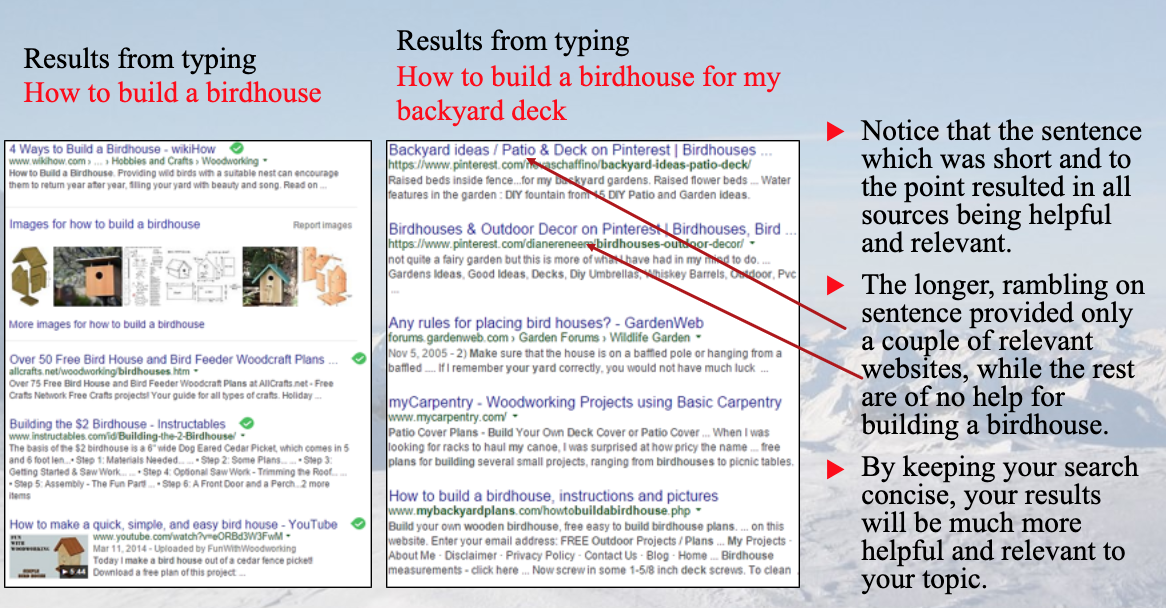
- For example, if you are trying to learn how to build a birhouse to put on your deck in your backyard, seach "How to build a bird house" instead of "How do I build a birdhouse for my backyard deck"
Birdhouse Example
Tips and Tricks for Search Engines
- In the birdhouse example, the added keywords 'backyard' and 'deck' led to results that were related to backyard decorating and ideas for decks. This took away from the keyword 'birdhouse'
- Trying similar searches in different ways is a good idea for avoiding this issue.
- For example, instead of typing 'How do I tie my shoes' try: 'Tying shoes' or 'Instructions for tying shoes' or 'How to tie shoes'
- By trying different combinations, the search engine will find different resources relating to the same issue, providing you with more information about your topic
- Practice different combinations of wording, or try using different key words until you find the right resources for your topic.
- Put quotation marks around a phrase or sentence if it is EXACTLY the sentence or phrase you are looking for.
- For example, typing: 'United States of America' will find websites that have the exact phrase United States of America in it, rather than websites with any of those words found anywhere in the page.
- The longer the phrase, the more specific your search becomes and the more likely your search will be empty, or with very few sources.
- Typing AND between keywords will search for websites that include all of the keywords searched. Good for topics with unrelated keywords.
- For example, if you type Baseball AND pencils AND jokes, your search results will include websites that have the words baseball, pencils and jokes all in the webpage.
(VIDEO)
2. Direct Website Search
- The least common way of researching, direct website searches involve using the search engine WITHIN a website, in which you are not searching the web, but you are searching inside the organization's archives or database.
- This method is used when you have a good idea of what information you need, and where you can get that information for your topic.
- This type of search saves time when you know the website you want to search through beforehand, such as a newspaper website or specific organization.
How They Work
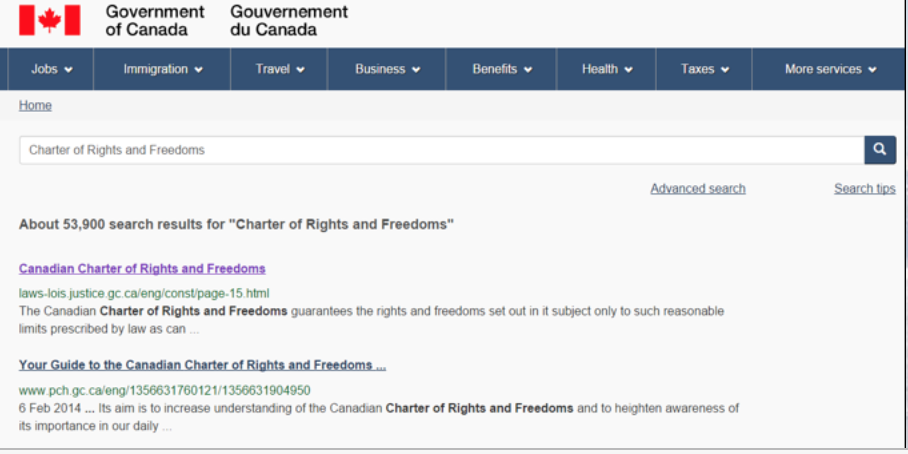
- Assume for example, that you are given a research project on the Canadian Chater of Rights and Freedoms.
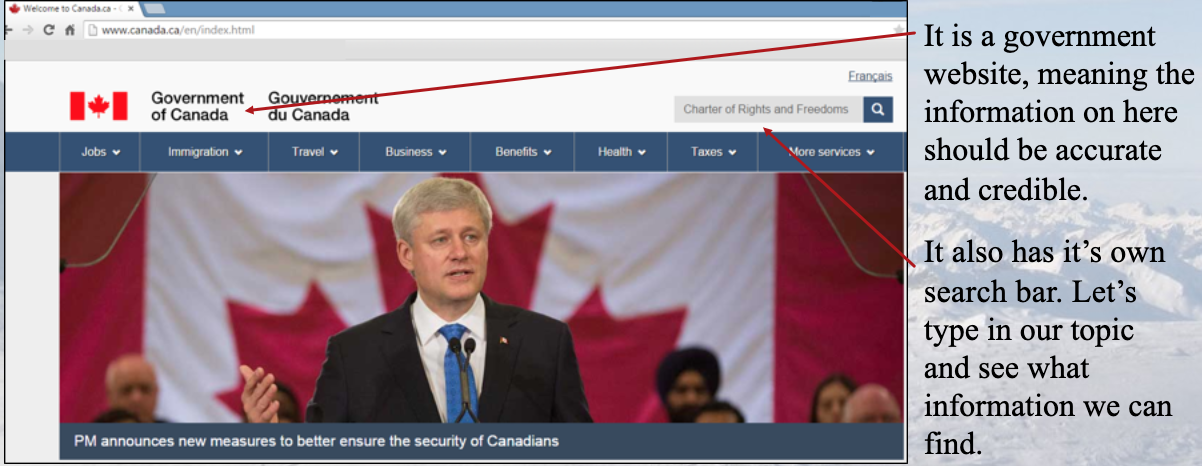
- Rather than using a search engine to look for various blogs, opinions, news articles or other sources regarding this legislation, it would be much faster and more effective to go directly to a Canadian government website, where the official document or list of the rights and freedoms would be given.
- In this case, you would type in Canada.ca or if you don't know the name of the website you can use a search engine to look it up, perhapes typing Canadian governemnt website.
- After reaching the desired website, you will see a search bar similar to your search engine, where you will type in your topic or do your keyword search.
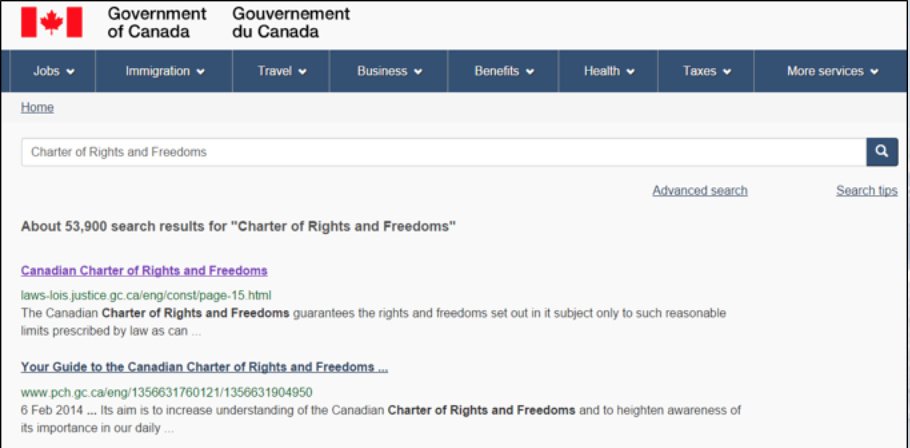
- For this example, you would want to search something like Charter of Rights and Freedoms
Charter of Rights and Freedoms Example
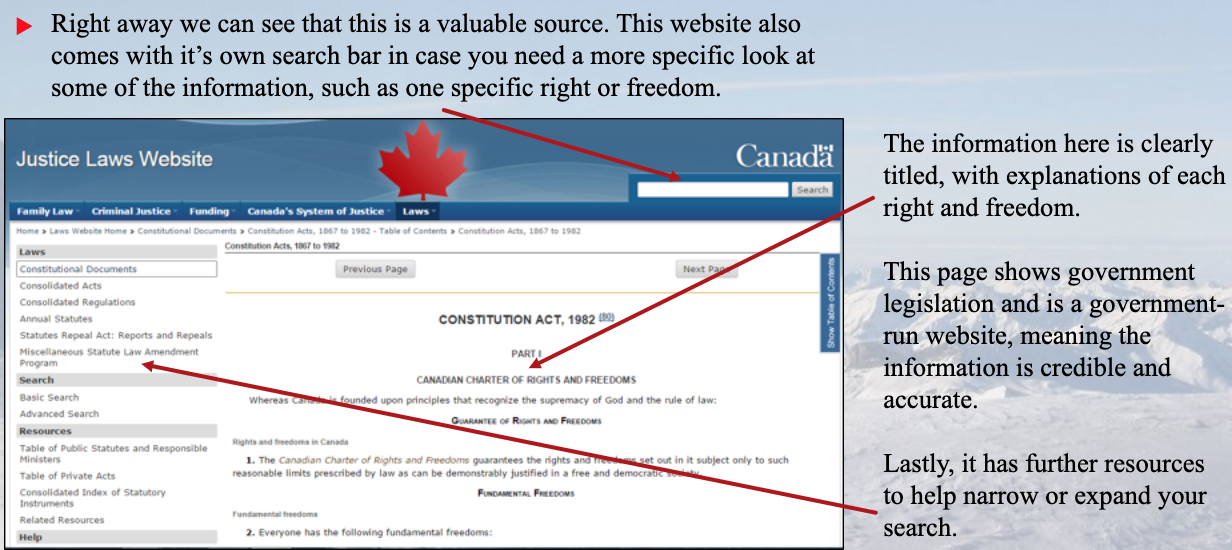
From here, you should determine if the website will be useful or not. This should also be done for all websites found off search engines. Let's see what we know.
After one simple search, an abundance of valuable searches appear, and it is then up to you to decide which is the most relevant or useful. The first option looks exactly like the website we need. Let's try it.
3. Databases
- Did you know that search engines only show about 20% of the information that is actually out there?
- Using effective searches and databases, we can access the other 80%.
- Databases are online collections of information. All information deemed credible and that is related to the field or subject area of that database is added to it.
- Databases provide more reliable information than search engines, and contain peer reviewed journals and books, scholarly articles, newspapers, essays, etc. from credible sources.
- Many databases require a paid subscription, however there are databases open to the public that can be accessed through your home, school, library, etc.
Researching Using a Database
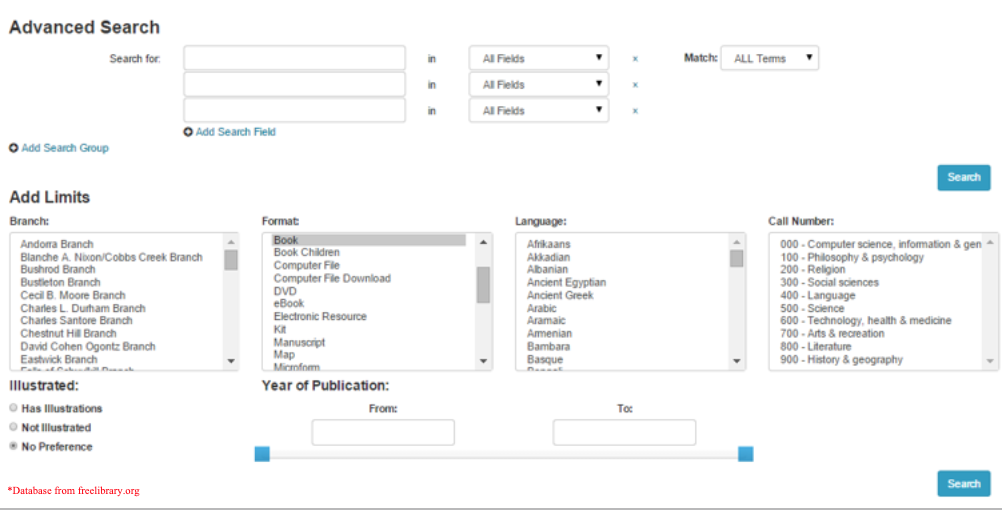
- Databases provide more ways of narrowing your research topic than search engines, in order to supply only relevant information.
- Databases allow you to search based on many keywords (just like a search engine), a range of years, the author's name, the subject, etc.
- When going onto a database, always click Advanced Search.
- Searches can often be too narrow, leading to minimal resources for us to use.
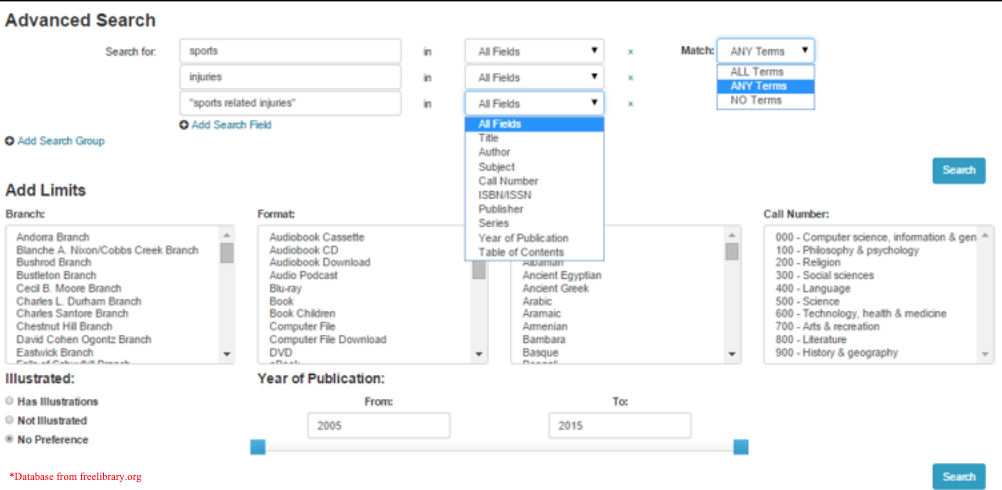
- The key is to try different combinations fo keywords and subjects, until your search fits your need.
- If your search is continually too narrow, then try using less keywords or subjects until the database supplies enough resources for you to choose from. You don't have to fill in every section of the search.
Database Advanced Search
Assume that you doing a project on sports related injuries in the last 10 years, here is an example of what a database's advanced search might look like:
Now that you know your research topic and have your database, you can start trying out different combinations. Below is an example of how you might fill in your advanced search:
Formatting Information Once You Find It
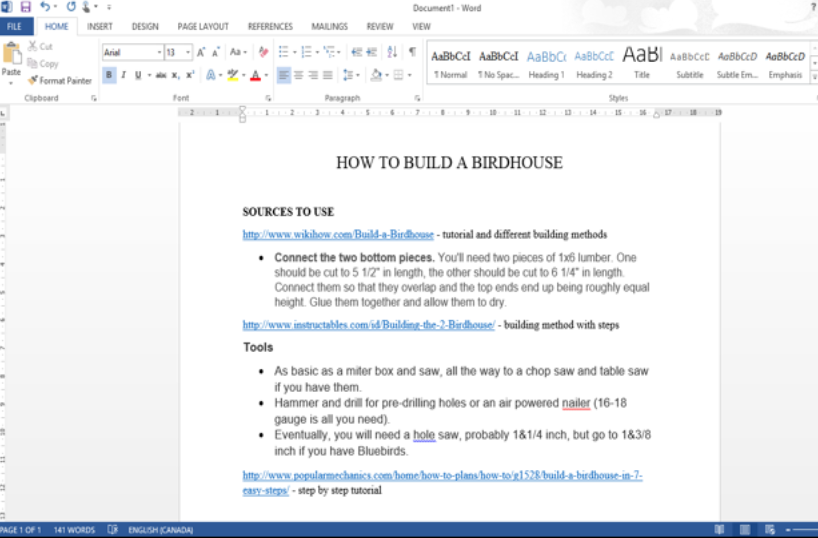
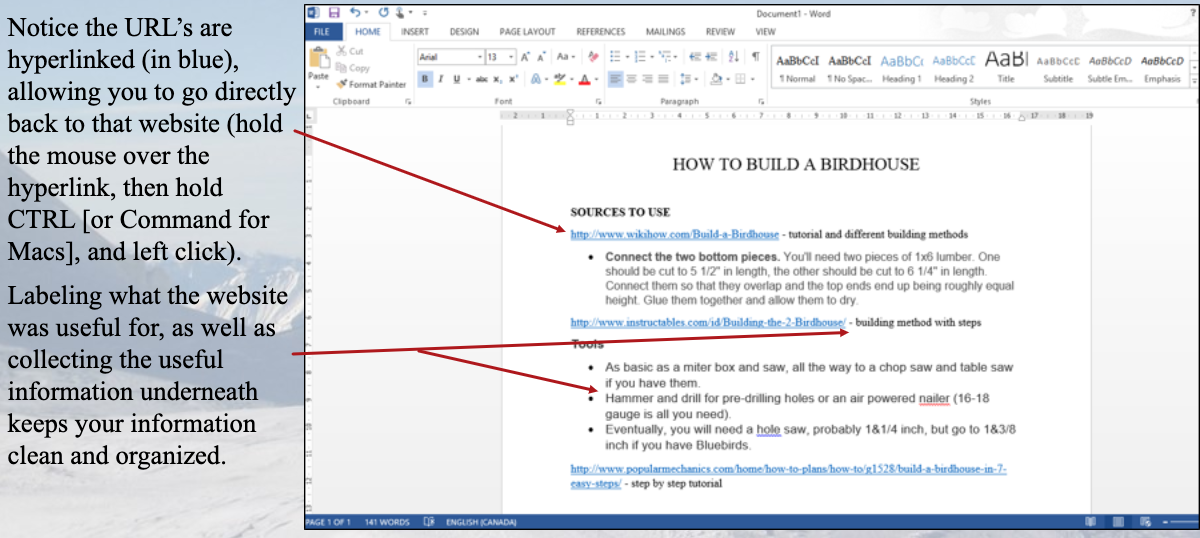
Whenever you find a website, news article, or other source of information that is useful to your assignment, SAVE IT! Create a document and colect all useful URL's so you can easily locate where you found your information from!
You can also save the paragraphs that relate directly to your topic by pasting them into your document, making the information readily available when you begin writing. This tip is for organizing your information only.
Remember that any information you use in your writing must be either quoted directly and cited, or paraphrased into your own words and then cited. See the file on Plagiarism and Citing Sources for more details.
Let's refer back to our birdhouse example. Assume you are writing a report on how to build a birdhouse, and were doing research for it. After looking through some websites, you've found the right sources for your report. What now?
Let's create a Word Document with all of our valuable sources.
Summing Up
- Online search engines and databases contain masses of information at your disposal, but it is important to NARROW your search.
- It is a good idea to use both databases and search engines for your research, as databases have more accurate and credible sources, which can be backed up by your information from the search engine.
- Steer clear of corporate websites stating information about their business.
- Keep your sources and information organized and easily accessible.
- Remember, researching valuable information takes time, so don't get discouraged if you can't find the information you need right away!